
Introducing Drawing Tools: Annotate Your Photos with Ease
Add shapes, lines, and arrows to your photos directly in your browser. Perfect for tutorials, feedback, and creative edits.
We are excited to announce the launch of our new Drawing Tools! You can now annotate your photos directly within PhotoEditBuddy, making it the perfect tool for creating tutorials, highlighting details, or adding creative flair to your images.
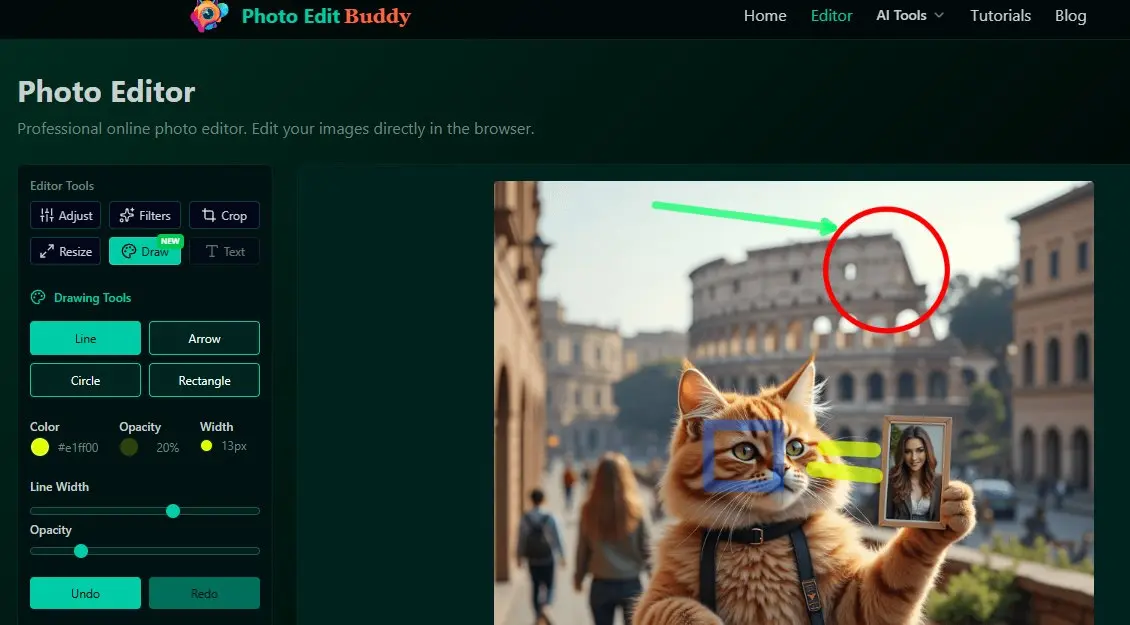
What's New?
The new drawing capabilities include a versatile set of tools designed for quick and easy annotations:
- Lines & Arrows: Perfect for pointing out specific parts of an image or creating diagrams.
- Shapes: Easily draw circles and rectangles to frame or highlight subjects.
- Customization: Adjust the color, opacity, and line width to match your style or brand.
How to Use It
You can access the drawing tools in two convenient ways:
- In the Editor: Switch to the new "Draw" tab in the main editor to annotate your current project.
- Quick Access: Visit our dedicated Drawing Tool page for a simplified, focused experience.
Why You'll Love It
Like all our tools, the Drawing feature runs entirely in your browser. This means your photos are processed instantly and securely on your device—no uploads, no waiting, and complete privacy.
Ready to try it out? Start drawing now or check out our detailed tutorial to learn more tips and tricks.